[AGM-2665] Add AdGuard Mini for Mac section #798
There are no files selected for viewing
| Original file line number | Diff line number | Diff line change |
|---|---|---|
| @@ -1,5 +1,5 @@ | ||
| { | ||
| "position": 10, | ||
| "label": "AdGuard Content Blocker", | ||
| "collapsible": true, | ||
| "collapsed": true | ||
|
|
||
| Original file line number | Diff line number | Diff line change |
|---|---|---|
| @@ -1,5 +1,5 @@ | ||
| { | ||
| "position": 11, | ||
| "label": "AdGuard for Linux", | ||
| "collapsible": true, | ||
| "collapsed": true | ||
|
|
||
| Original file line number | Diff line number | Diff line change |
|---|---|---|
| @@ -0,0 +1,6 @@ | ||
| { | ||
| "position": 9, | ||
| "label": "AdGuard Mini for Mac", | ||
| "collapsible": true, | ||
| "collapsed": true | ||
| } |
| Original file line number | Diff line number | Diff line change |
|---|---|---|
| @@ -0,0 +1,28 @@ | ||
| --- | ||
| title: AdGuard Mini for Mac | ||
| sidebar_position: 1 | ||
| --- | ||
|
|
||
| :::info | ||
|
|
||
| This page is about AdGuard Mini for Mac, which safeguards only your Safari browser. To protect your Mac entirely, [download the AdGuard app](https://agrd.io/download-kb-adblock) | ||
|
|
||
| ::: | ||
|
|
||
| AdGuard Mini for Mac (formerly AdGuard for Safari) was designed to conform to Apple’s restrictions for ad blocking browser extensions. Although it can’t be compared to our desktop ad blocking apps, it’s free and can protect you from ads, trackers, phishing, and malicious websites. | ||
|
|
||
| - [Features](/adguard-mini-for-mac/features/features.md) | ||
|
|
||
| Main features and settings available in AdGuard Mini for Mac | ||
|
|
||
| - [Installation](/adguard-mini-for-mac/installation.md) | ||
|
|
||
| Installation, removal, and system requirements for AdGuard Mini for Mac | ||
|
|
||
| - [Safari extensions](/adguard-mini-for-mac/extensions.md) | ||
|
|
||
| Mechanisms that enable content blocking and add functionality to the Safari web browser | ||
|
|
||
| - [Solving problems](/adguard-mini-for-mac/solving-problems/solving-problems.md) | ||
|
|
||
| Known issues and possible solutions |
| Original file line number | Diff line number | Diff line change |
|---|---|---|
| @@ -0,0 +1,76 @@ | ||
| --- | ||
| title: Safari extensions | ||
| sidebar_position: 3 | ||
| --- | ||
|
|
||
| :::info | ||
|
|
||
| This article is about AdGuard Mini for Mac, which safeguards only your Safari browser. To protect your Mac entirely, [download the AdGuard app](https://agrd.io/download-kb-adblock) | ||
|
|
||
| ::: | ||
|
|
||
| ## What Safari extensions are | ||
|
|
||
| Safari extensions are small software programs that add functionality to the Safari web browser. They allow users to customize and enhance their browsing experience by adding features that are not natively built into the browser. AdGuard Mini for Mac uses extensions primarily to apply filtering rules on websites opened in Safari. | ||
|
|
||
| ## How it works | ||
|
|
||
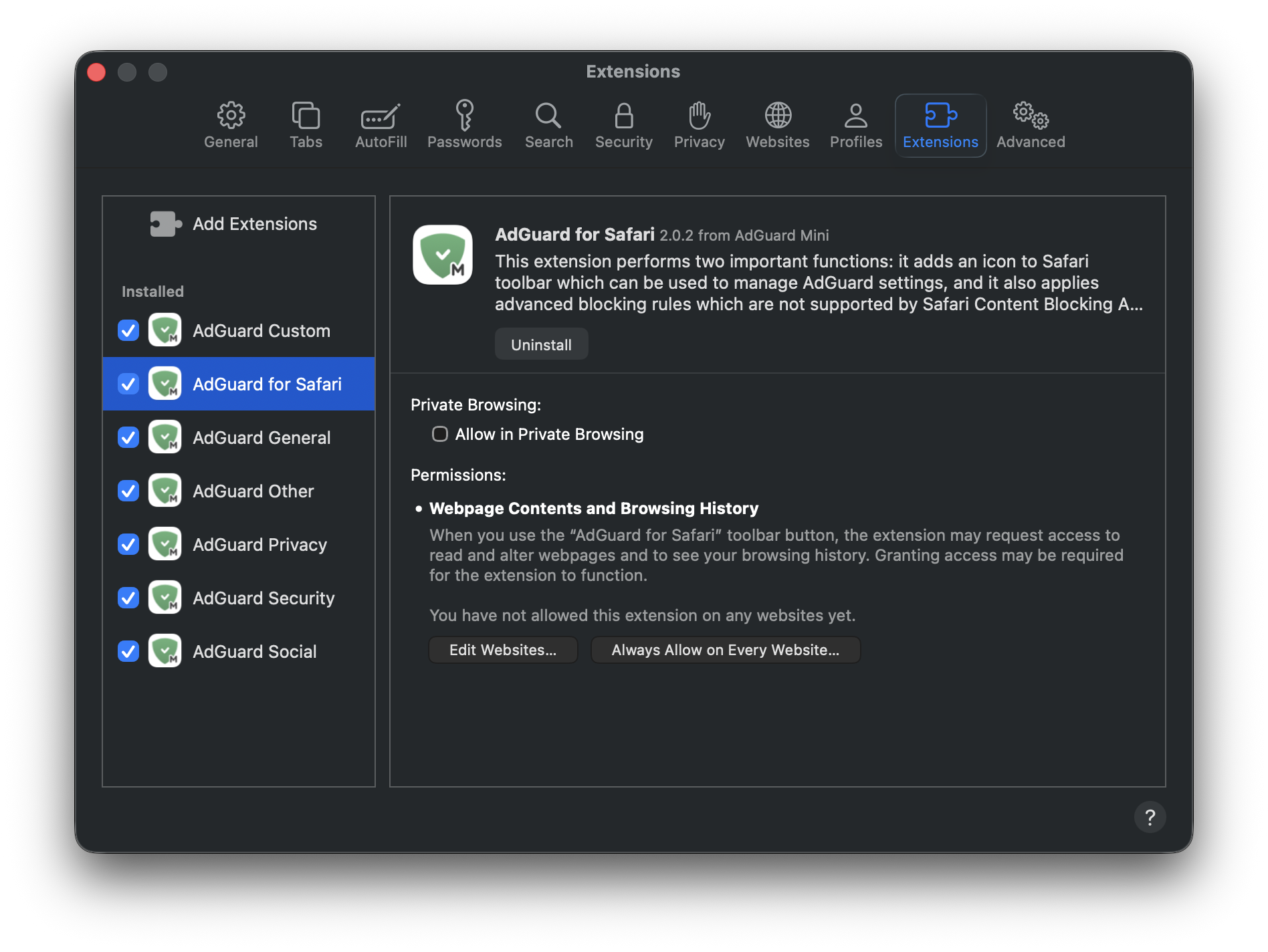
| To block ads, trackers, and annoyances on websites, AdGuard uses filtering rules. The rules from AdGuard’s and your custom filters are converted into ones comprehensible by Safari and are integrated into 6 Safari extensions: | ||
|
|
||
| - AdGuard General | ||
| - AdGuard Privacy | ||
| - AdGuard Social | ||
| - AdGuard Security | ||
| - AdGuard Custom | ||
| - AdGuard Other | ||
|
|
||
| Each content-blocking extension can include up to 150,000 active filtering rules. The number of rules within most filter groups does not surpass 150,000. However, if you activate too many language-specific or custom filters, you might exceed the limit. In such cases, random rules that are over the limit will be automatically disabled, which may lead to incorrect blocking. **We strongly recommend activating only the filters you need**. | ||
|
|
||
| There is also one more extension responsible for other features: *AdGuard for Safari*, which adds the AdGuard icon next to the search bar in Safari and allows using advanced rules to block complex ads. | ||
|
|
||
|  | ||
|
|
||
| More on each extension below. | ||
|
|
||
| ## Content-blocking extensions | ||
|
|
||
| *AdGuard General* applies rules from filters that you can find in *Settings* → *Filters* → *Ad blocking* and *Language-specific*. This extension focuses on comprehensive ad blocking and includes filters for ads in specific languages. | ||
|
|
||
| *AdGuard Privacy* applies rules from filters located in *Filters* → *Privacy*. It blocks tracking mechanisms and ensures that your browsing activity remains private. | ||
|
|
||
| *AdGuard Social* applies rules from filters that can be found in *Filters* → *Social Widgets* and *Filters* → *Annoyances*. It blocks popups, social media buttons, online assistant windows, and other elements on webpages that you might find annoying. | ||
|
|
||
| *AdGuard Security* applies rules from filters under *Filters* → *Security*. This extension identifies and blocks potentially harmful elements, safeguarding users from malicious content. | ||
|
|
||
| *AdGuard Other* applies rules from filters that don’t fall under the above-mentioned categories and that are located in *Filters* → *Other*: *Filter unblocking search ads and self-promotion*, *AdGuard DNS filter*, and *AdGuard Experimental filter*. | ||
|
|
||
| *AdGuard Custom* applies rules from filters that you add on your own to *Custom filters*. | ||
|
|
||
| User rules and allowlist rules are included in every extension. | ||
|
|
||
| ## AdGuard for Safari | ||
|
|
||
| *AdGuard for Safari* activates the AdGuard icon next to the search bar. It’s useful if you want to quickly set up protection for a specific website or block ads manually. | ||
|
|
||
| *AdGuard for Safari* extension also contains advanced rules that aren’t converted to the format supported by Safari. These include [CSS rules](/general/ad-filtering/create-own-filters#cosmetic-css-rules), [extended CSS selectors](/general/ad-filtering/create-own-filters#extended-css-selectors), and [scriptlets](/general/ad-filtering/create-own-filters#scriptlets), which allow AdGuard to block complex ads, such as those on YouTube. | ||
|
|
||
| ## How to manage Safari extensions | ||
|
|
||
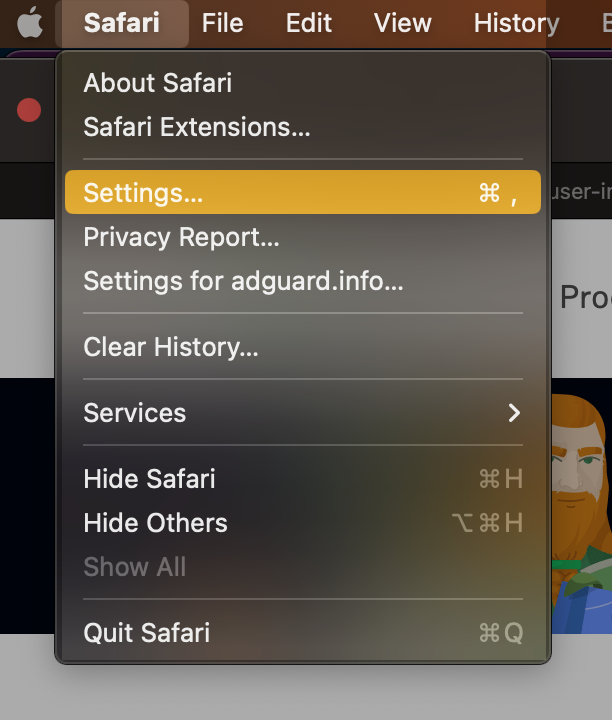
| 1. Open Safari and click *Safari* in the upper left corner of the screen to expand the menu. | ||
|
|
||
|  | ||
|
|
||
| 2. Click *Settings...* | ||
|
|
||
| 3. Select *Extensions*. | ||
|
|
||
|  | ||
|
|
||
| ## Why AdGuard for Safari requires permission | ||
|
|
||
| When enabling the *AdGuard for Safari* extension, you might notice that it requires **access to webpage content** and **access to browsing history**. Here’s why it needs these permissions: | ||
|
|
||
| - Access to webpage content is required for manual ad blocking and advanced blocking rules to work correctly | ||
| - Access to browsing history is required to check the protection status on websites and determine which advanced rules should be applied | ||
|
|
||
| We do not use this data for any other purpose or share it with anyone. For more info, you can consult our [Privacy policy](https://adguard.com/privacy.html). | ||
| Original file line number | Diff line number | Diff line change |
|---|---|---|
| @@ -0,0 +1,6 @@ | ||
| { | ||
| "position": 2, | ||
| "label": "Features", | ||
| "collapsible": true, | ||
| "collapsed": true | ||
| } |
| Original file line number | Diff line number | Diff line change |
|---|---|---|
| @@ -0,0 +1,24 @@ | ||
| --- | ||
| title: About | ||
| sidebar_position: 7 | ||
| --- | ||
|
|
||
|  | ||
|
|
||
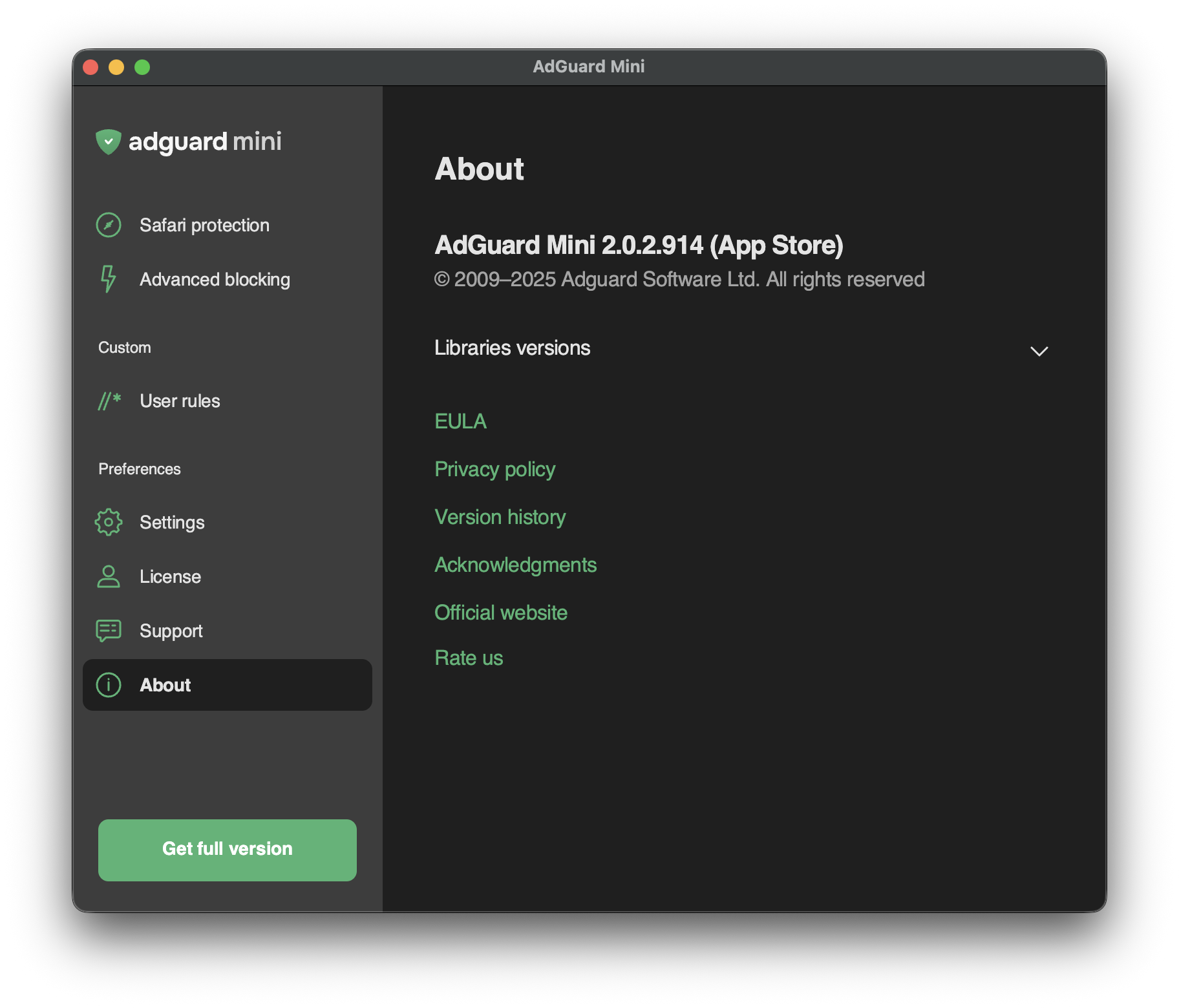
| On the *About* tab, you can check: | ||
|
|
||
| - Current version of your AdGuard Mini app | ||
|
Contributor
Author
There was a problem hiding this comment. I think you can say it's kinda both because you install it from the App Store like any other app, and it has menu bar popup and an app window like a proper app |
||
| - Current versions of the libraries | ||
|
|
||
| You can also find the links to: | ||
|
|
||
| - Our official website | ||
| - EULA and Privacy policy | ||
| - Acknowledgements | ||
| - Version history | ||
|
|
||
| :::note Reminder | ||
|
|
||
| AdGuard Mini for Mac can be downloaded for free [from the App Store](https://agrd.io/mini_mac). A detailed setup instruction is available in [this Knowledge Base article](/adguard-mini-for-mac/installation/). | ||
|
|
||
| ::: | ||


| Original file line number | Diff line number | Diff line change |
|---|---|---|
| @@ -0,0 +1,16 @@ | ||
| --- | ||
| title: Advanced blocking | ||
| sidebar_position: 3 | ||
| --- | ||
|
|
||
|  | ||
|
|
||
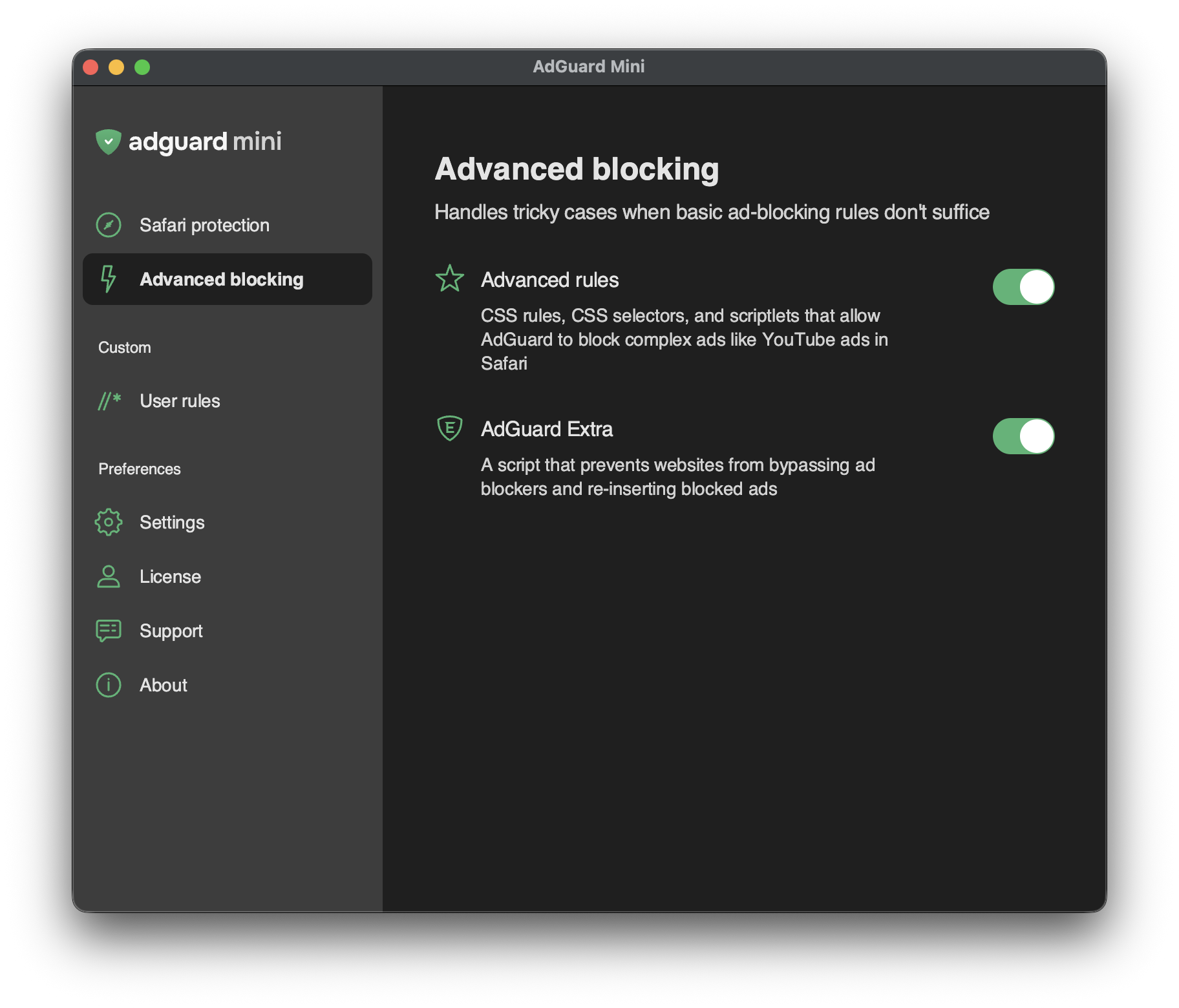
| *Advanced blocking* is optional, but when enabled it unlocks stronger filtering: for example, it lets us apply extended rules to block tough cases such as some YouTube ads. You decide whether to grant Safari the extra permissions and whether you want that extra power. | ||
|
|
||
| Here you can turn on the *AdGuard Extra* userscript — if there’s a website where ads just won’t go, like Facebook or YouTube. | ||
|
|
||
| :::note | ||
|
|
||
| *AdGuard Extra* is a feature of the [full version](/adguard-mini-for-mac/features/full-version.md). | ||
|
|
||
| ::: |
| Original file line number | Diff line number | Diff line change | ||||
|---|---|---|---|---|---|---|
| @@ -0,0 +1,36 @@ | ||||||
| --- | ||||||
| title: Features | ||||||
| sidebar_position: 1 | ||||||
| --- | ||||||
|
|
||||||
| - [Safari protection](/adguard-mini-for-mac/features/safari-protection.md) | ||||||
|
|
||||||
| Core filtering feature with customizable options | ||||||
|
|
||||||
| - [Advanced blocking](/adguard-mini-for-mac/features/advanced-blocking.md) | ||||||
|
|
||||||
| Unlocks stronger filtering capabilities | ||||||
|
|
||||||
| - [User rules](/adguard-mini-for-mac/features/rules.md) | ||||||
|
|
||||||
| Custom filtering rules to fine-tune ad blocking | ||||||
|
|
||||||
| - [Settings](/adguard-mini-for-mac/features/settings/settings.md) | ||||||
|
|
||||||
| Various options that help you configure the app and filtering | ||||||
|
Contributor
There was a problem hiding this comment.
Suggested change
|
||||||
|
|
||||||
| - [Support](/adguard-mini-for-mac/features/support.md) | ||||||
|
|
||||||
| Helpful options for when you have a question or encountered a problem | ||||||
|
|
||||||
| - [About](/adguard-mini-for-mac/features/about.md) | ||||||
|
|
||||||
| Info about the app’s current version and a list of helpful links | ||||||
|
Contributor
There was a problem hiding this comment.
Suggested change
|
||||||
|
|
||||||
| - [Safari toolbar menu](/adguard-mini-for-mac/features/toolbar-menu.md) | ||||||
|
|
||||||
| A handy menu in the Safari toolbar | ||||||
|
|
||||||
| - [Full version](/adguard-mini-for-mac/features/full-version.md) | ||||||
|
|
||||||
| Advanced features that enhance filtering speed and power | ||||||
| Original file line number | Diff line number | Diff line change |
|---|---|---|
| @@ -0,0 +1,20 @@ | ||
| --- | ||
| title: Full version | ||
| sidebar_position: 9 | ||
| --- | ||
|
|
||
| AdGuard Mini for Mac’s full version unlocks advanced features that provide extra filtering speed and power. | ||
|
|
||
| To activate it, you can use a regular AdGuard license, which is obtainable [on our website](https://adguard.com/license.html) or through in-app purchase. You can also use the 14-day trial to test the features beforehand. | ||
|
|
||
| ### AdGuard Extra | ||
|
|
||
| AdGuard Extra is an advanced script that handles complex ads, mostly on social media and online video platforms. It also shuts down ad blocking circumvention technologies such as ad re-insertion. | ||
|
|
||
|  | ||
|
|
||
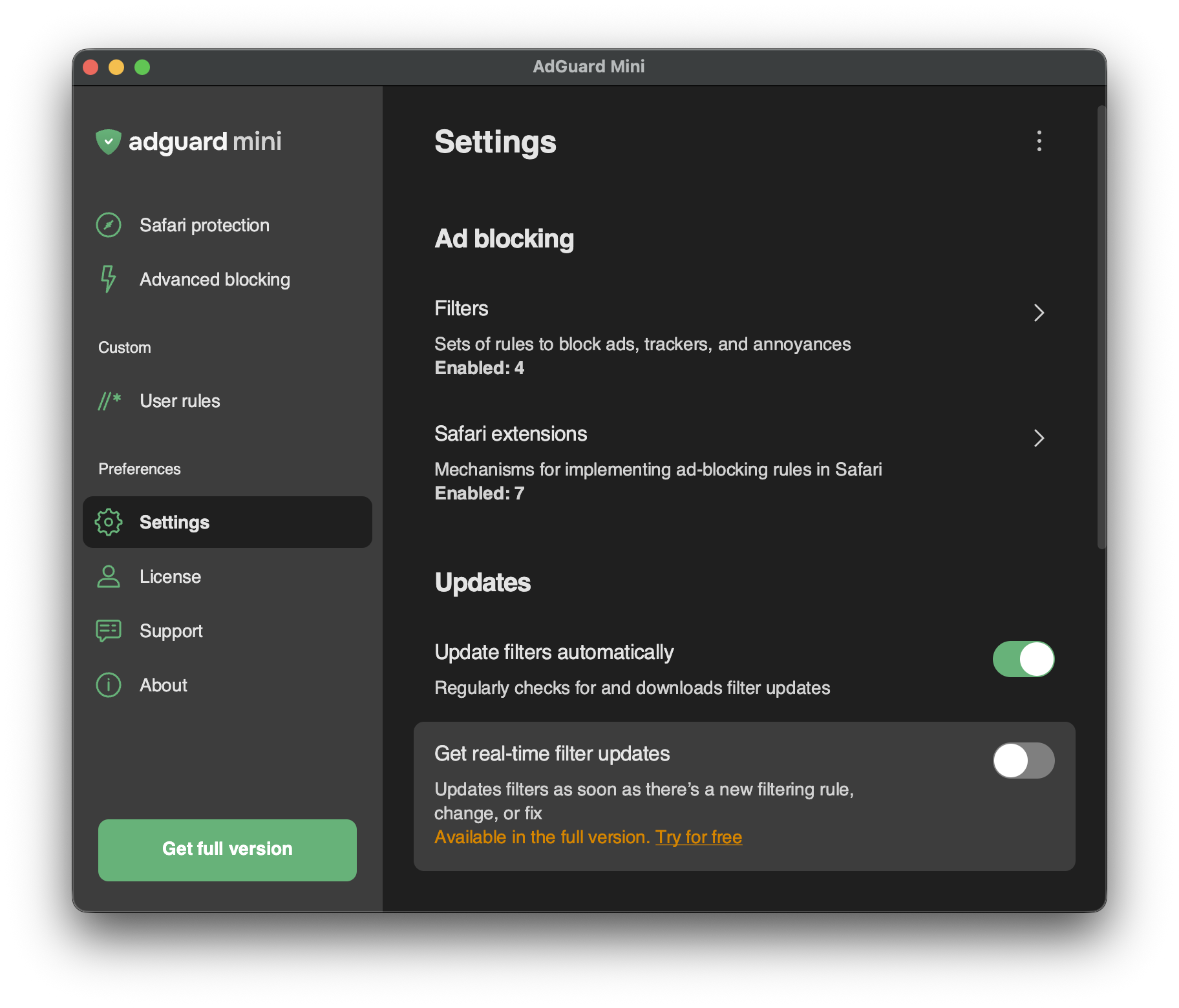
| ### Real-time filter updates | ||
|
|
||
| Receive filter updates as soon as there is a new rule or a fix. This ensures that your filters are always up-to-date and no ad slips through. | ||
|
|
||
|  |
| Original file line number | Diff line number | Diff line change | ||||||||
|---|---|---|---|---|---|---|---|---|---|---|
| @@ -0,0 +1,20 @@ | ||||||||||
| --- | ||||||||||
| title: User rules | ||||||||||
| sidebar_position: 4 | ||||||||||
| --- | ||||||||||
|
|
||||||||||
|  | ||||||||||
|
|
||||||||||
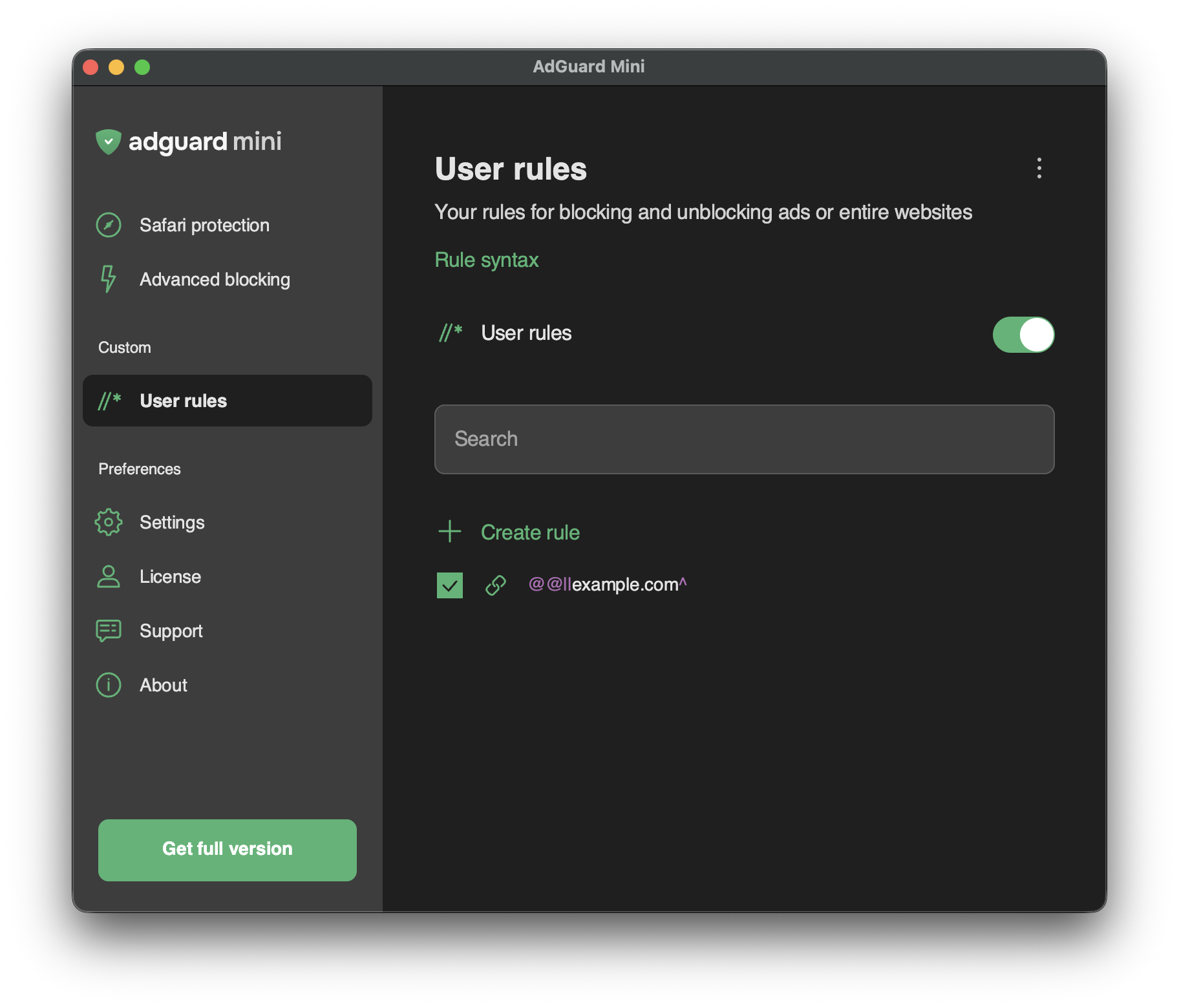
| User rules can be used to customize ad blocking when you want something personal: exclude a website from filtering, unblock requests, or allow scripts on a certain webpage. They can be added manually, imported, or created automatically when you block an element on the page. | ||||||||||
|
|
||||||||||
| To add your own filtering rules, use a [special syntax](/general/ad-filtering/create-own-filters). | ||||||||||
|
|
||||||||||
| ### Rule constructor | ||||||||||
|
|
||||||||||
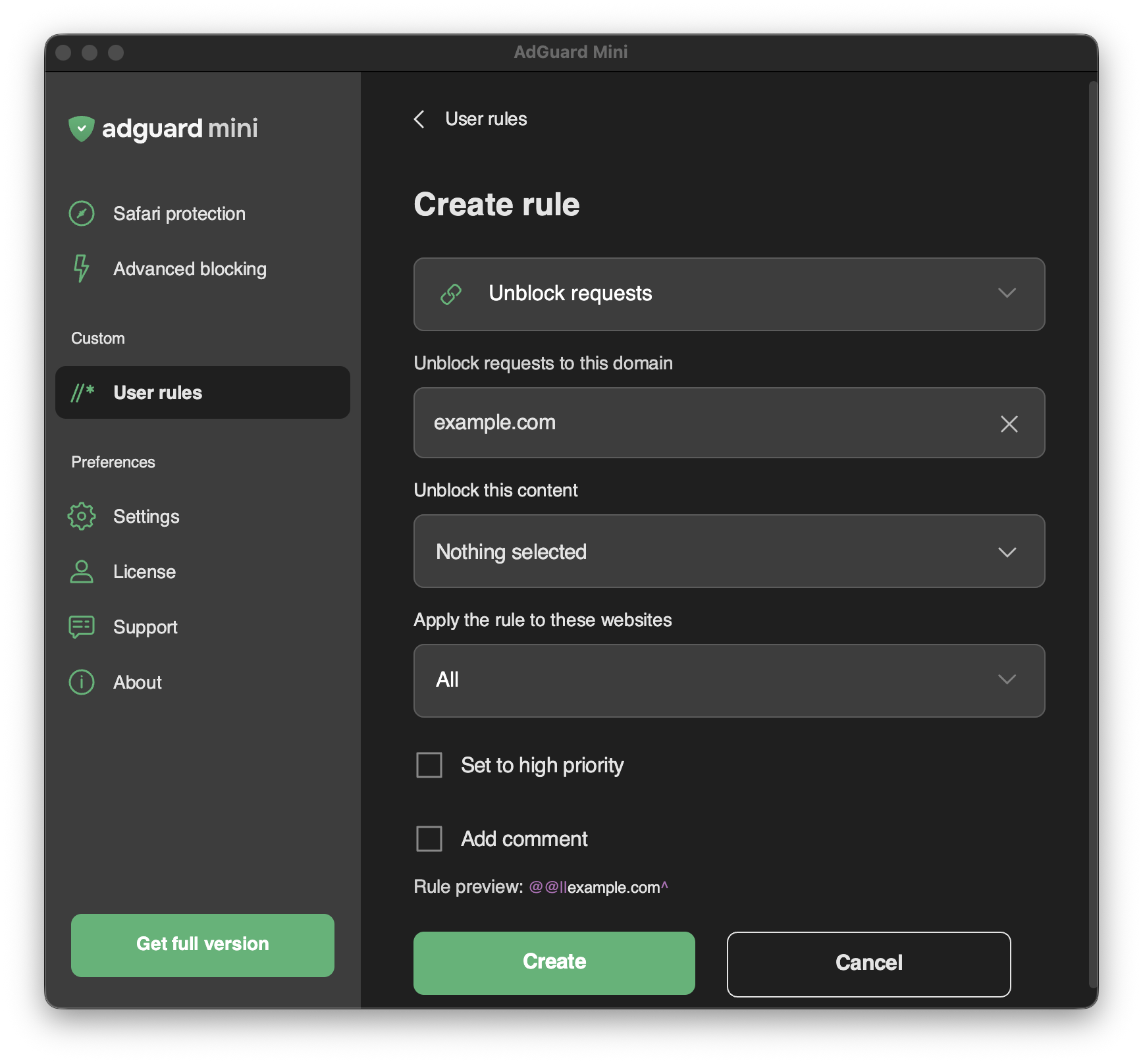
| We understand that writing filtering rules yourself is not every user’s cup of tea. That’s why you can just click *Create rule* to use a rule constructor: choose what you want to do, click through a few options, and you’re done. Block images, videos, scripts, or any other elements you’d rather not see on a page. | ||||||||||
|
|
||||||||||
|  | ||||||||||
|
|
||||||||||
| Here’s an example of a tricky case — a cookie popup that resists filtering. Find it in the page code, then open *User rules* and create a rule to block it: | ||||||||||
|
|
||||||||||
| <iframe class="youtube-video" src="https://cdn.adtidy.org/content/blog/rule.mp4" title="Video player" frameborder="0" allow="accelerometer; autoplay; clipboard-write; encrypted-media; gyroscope; picture-in-picture" allowfullscreen></iframe> | ||||||||||
|
Contributor
There was a problem hiding this comment. The iframe tag is using escaped HTML entities (
Suggested change
Contributor
There was a problem hiding this comment. The iframe tag is using escaped HTML entities (
Suggested change
vyanovsky marked this conversation as resolved.
Show resolved
Hide resolved
|
||||||||||

| Original file line number | Diff line number | Diff line change | ||||
|---|---|---|---|---|---|---|
| @@ -0,0 +1,22 @@ | ||||||
| --- | ||||||
| title: Safari protection | ||||||
| sidebar_position: 2 | ||||||
| --- | ||||||
|
|
||||||
| :::info | ||||||
|
|
||||||
| This article is about AdGuard Mini for Mac, which safeguards only your Safari browser. To protect your Mac entirely, [download the AdGuard app](https://agrd.io/download-kb-adblock) | ||||||
|
|
||||||
| ::: | ||||||
|
|
||||||
| ## Safari protection | ||||||
|
|
||||||
|  | ||||||
|
|
||||||
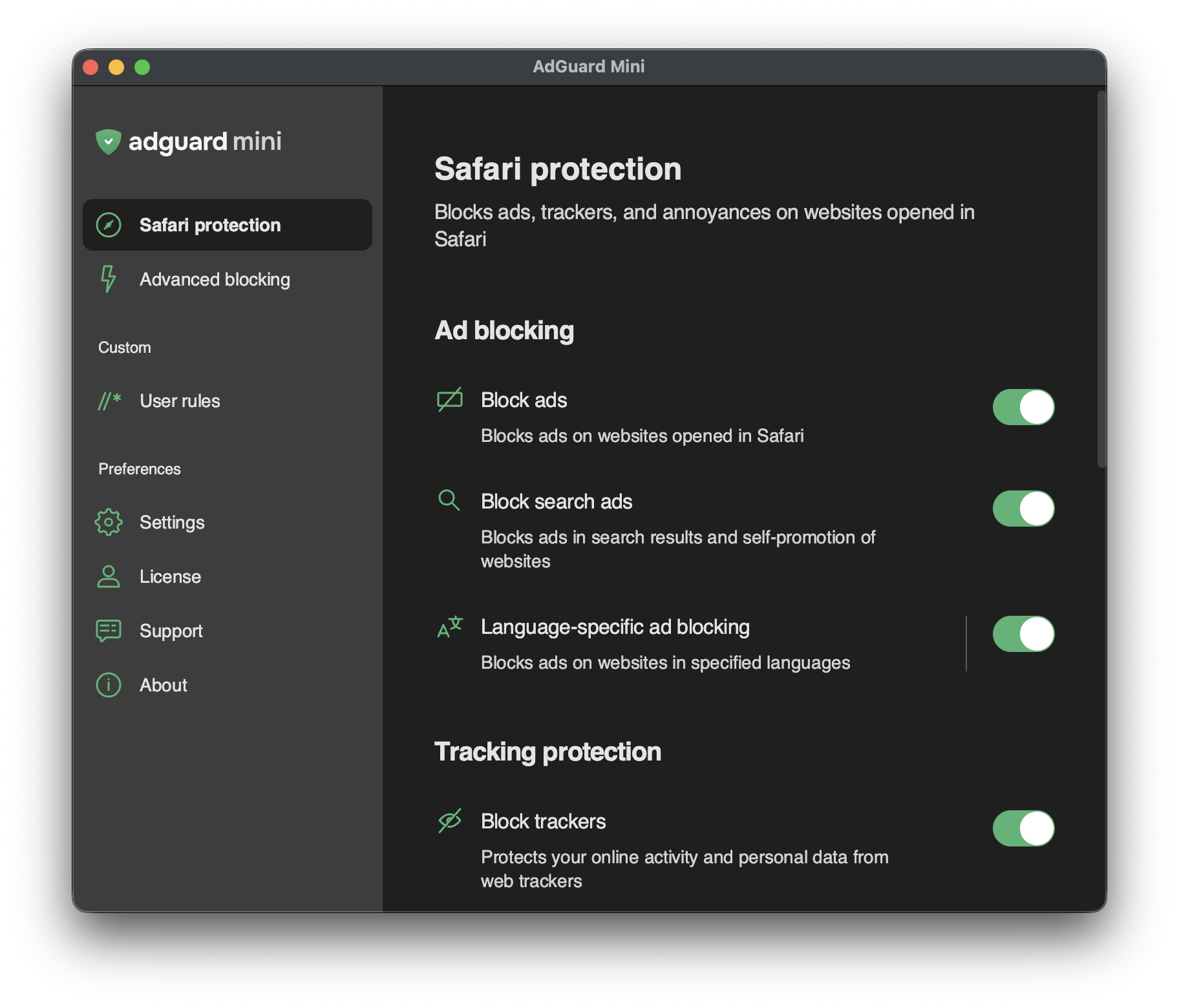
| *Safari protection* section is the most important area for the app’s core purpose. Settings are grouped logically and explained in plain language so you can quickly see what each option does. | ||||||
|
Contributor
There was a problem hiding this comment.
Suggested change
|
||||||
|
|
||||||
| Here’s a simple explanation on what each group of settings does: | ||||||
|
|
||||||
| 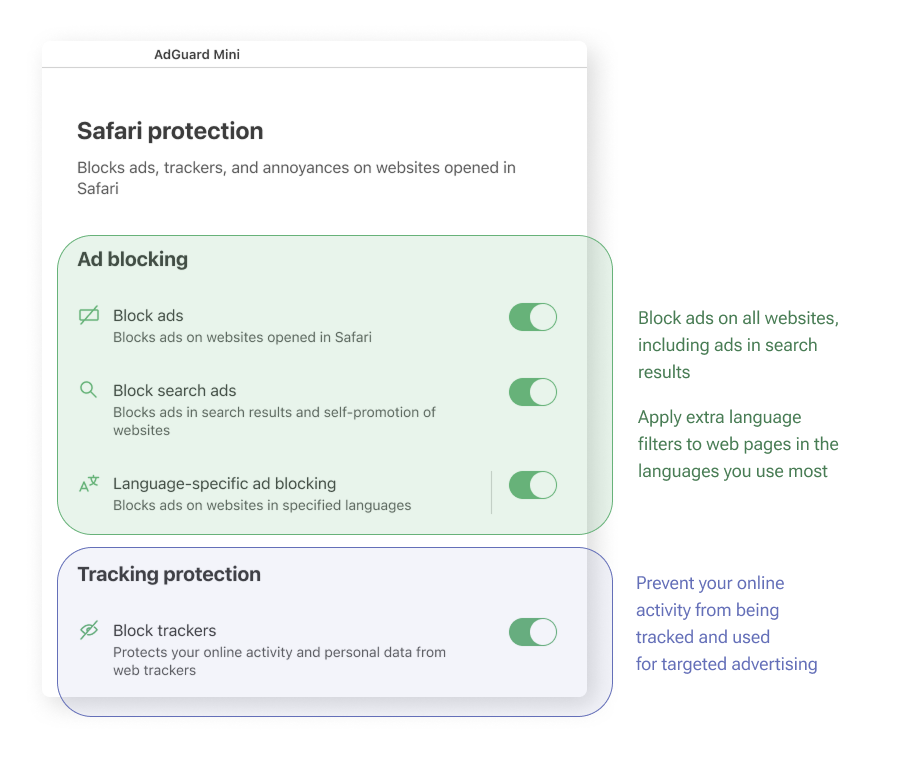 | ||||||
|
|
||||||
| 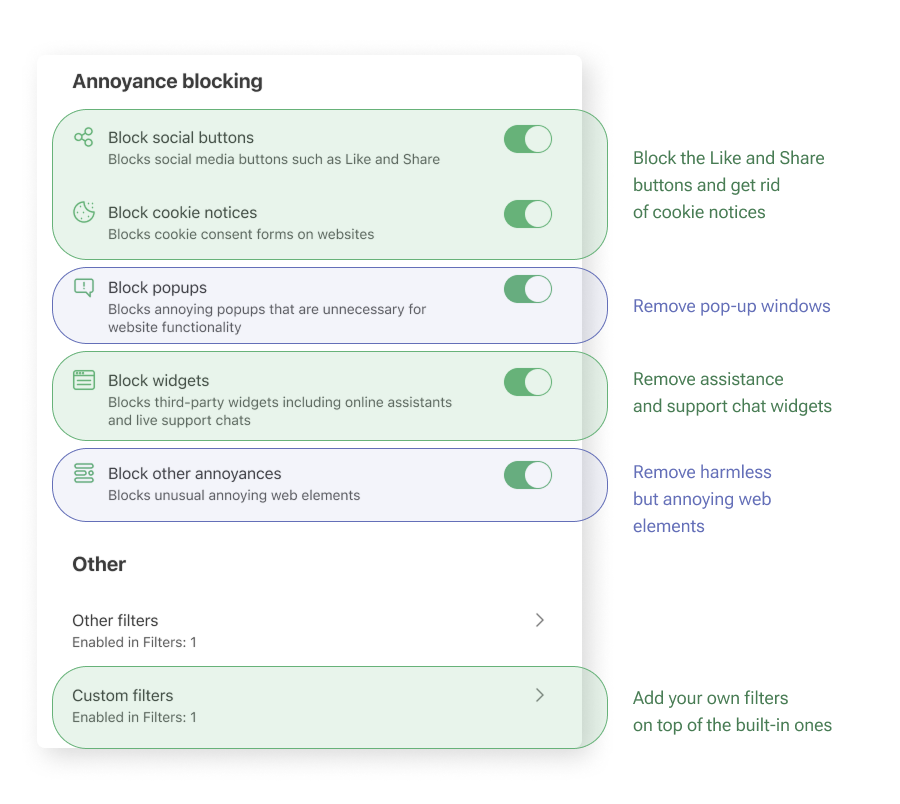 | ||||||
|
Comment on lines
+20
to
+22
Contributor
There was a problem hiding this comment. The document shows two screenshots but doesn't provide any explanation of what they contain. Consider adding descriptions of the settings shown in each screenshot to fulfill the promise made in the preceding text.
Contributor
Author
There was a problem hiding this comment. there are text explanations on the screenshot itself |
||||||
| Original file line number | Diff line number | Diff line change |
|---|---|---|
| @@ -0,0 +1,6 @@ | ||
| { | ||
| "position": 5, | ||
| "label": "Settings", | ||
| "collapsible": true, | ||
| "collapsed": true | ||
| } |
| Original file line number | Diff line number | Diff line change |
|---|---|---|
| @@ -0,0 +1,24 @@ | ||
| --- | ||
| title: Filters | ||
| sidebar_position: 2 | ||
| --- | ||
|
|
||
|  | ||
|
|
||
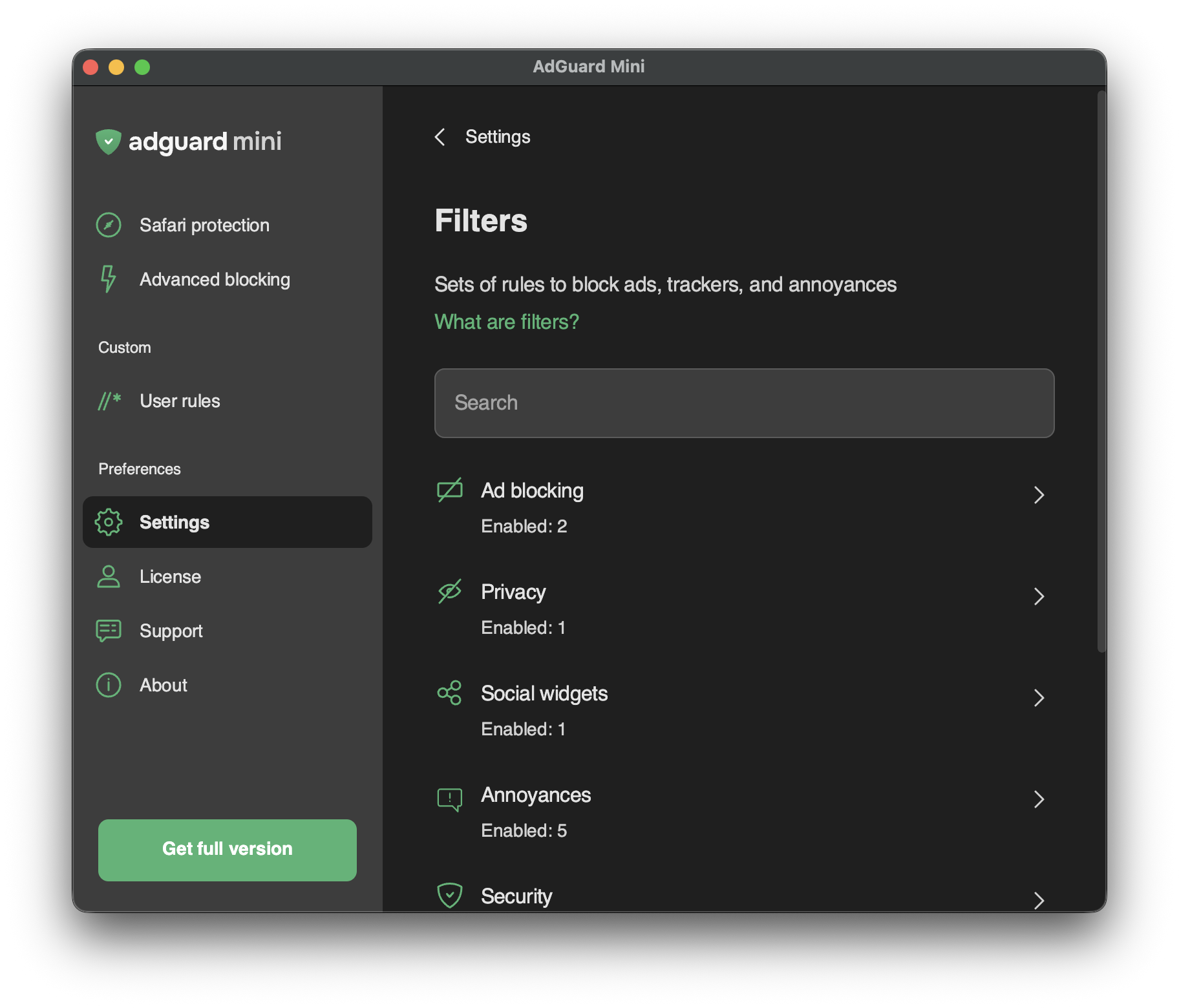
| In *Settings* → *Filters*, you can enable separate filters or whole categories of filters. | ||
|
|
||
| Filters are the backbone of ad blocking and basically it’s what keeps the Internet clean. A filter is a list of rules written in a special syntax. Following these rules, content blockers can filter web traffic: block ads or requests to malicious websites. | ||
|
|
||
| Filters are combined into eight thematic categories: *Ad Blocking, Privacy, Social widgets, Annoyances, Security, Language-specific filters, Custom,* and *Other filters*. | ||
|
|
||
| Read more about [AdGuard filters](/general/ad-filtering/adguard-filters) or [ad filtering in general](/general/ad-filtering/how-ad-blocking-works). | ||
|
|
||
| Changes in *Filters* are also reflected in *Settings* → *Safari extensions*. | ||
|
|
||
| ## Custom filters | ||
|
|
||
|  | ||
|
|
||
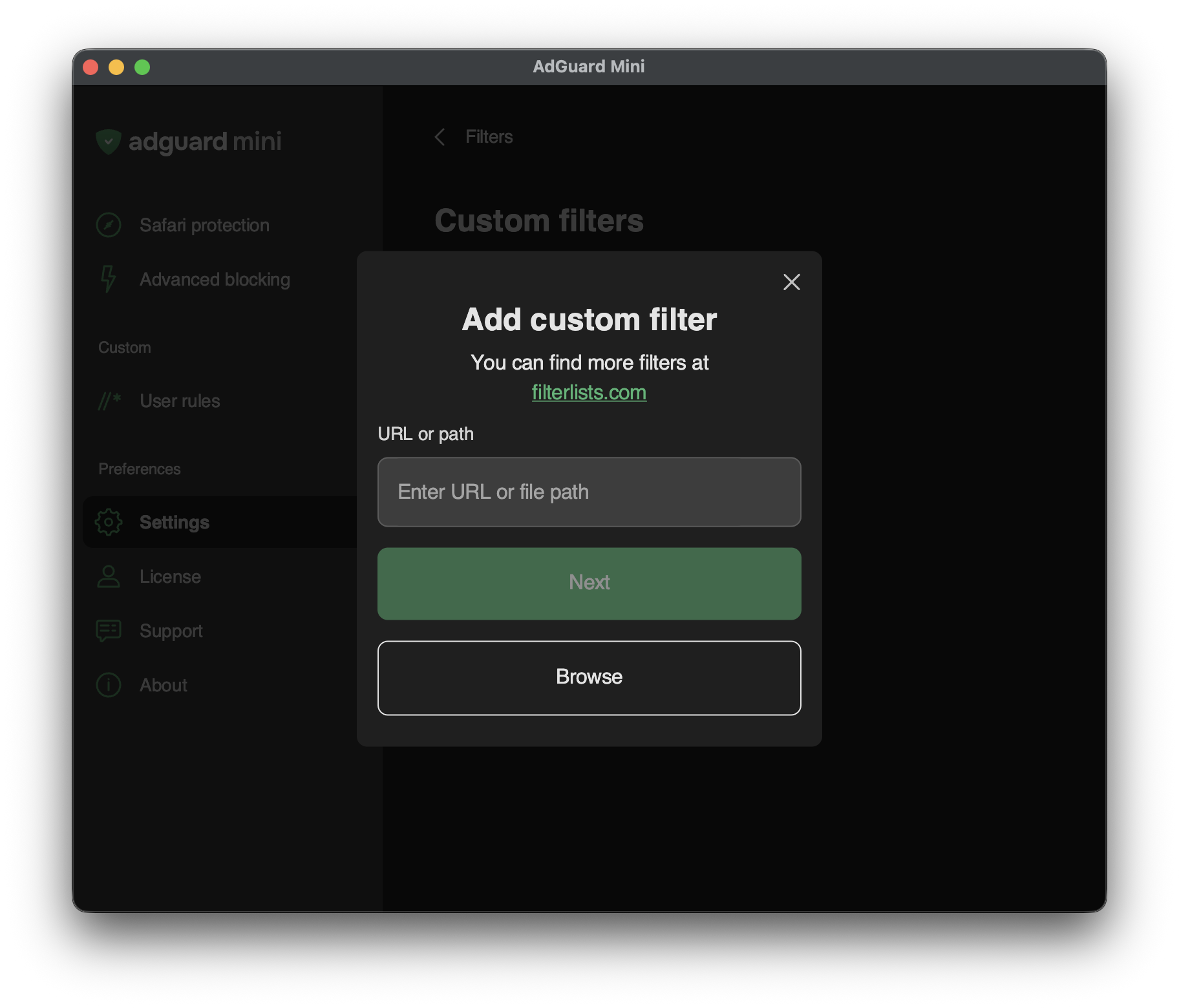
| To add a custom filter, go to *Settings* → *Filters* → *Custom filters* and enter a URL or a local file path in the relevant field. | ||
|
|
||
| You can find a lot of filters at [filterlists.com](https://filterlists.com/). |
| Original file line number | Diff line number | Diff line change |
|---|---|---|
| @@ -0,0 +1,60 @@ | ||
| --- | ||
| title: Safari extensions | ||
| sidebar_position: 3 | ||
| --- | ||
|
|
||
|  | ||
|
|
||
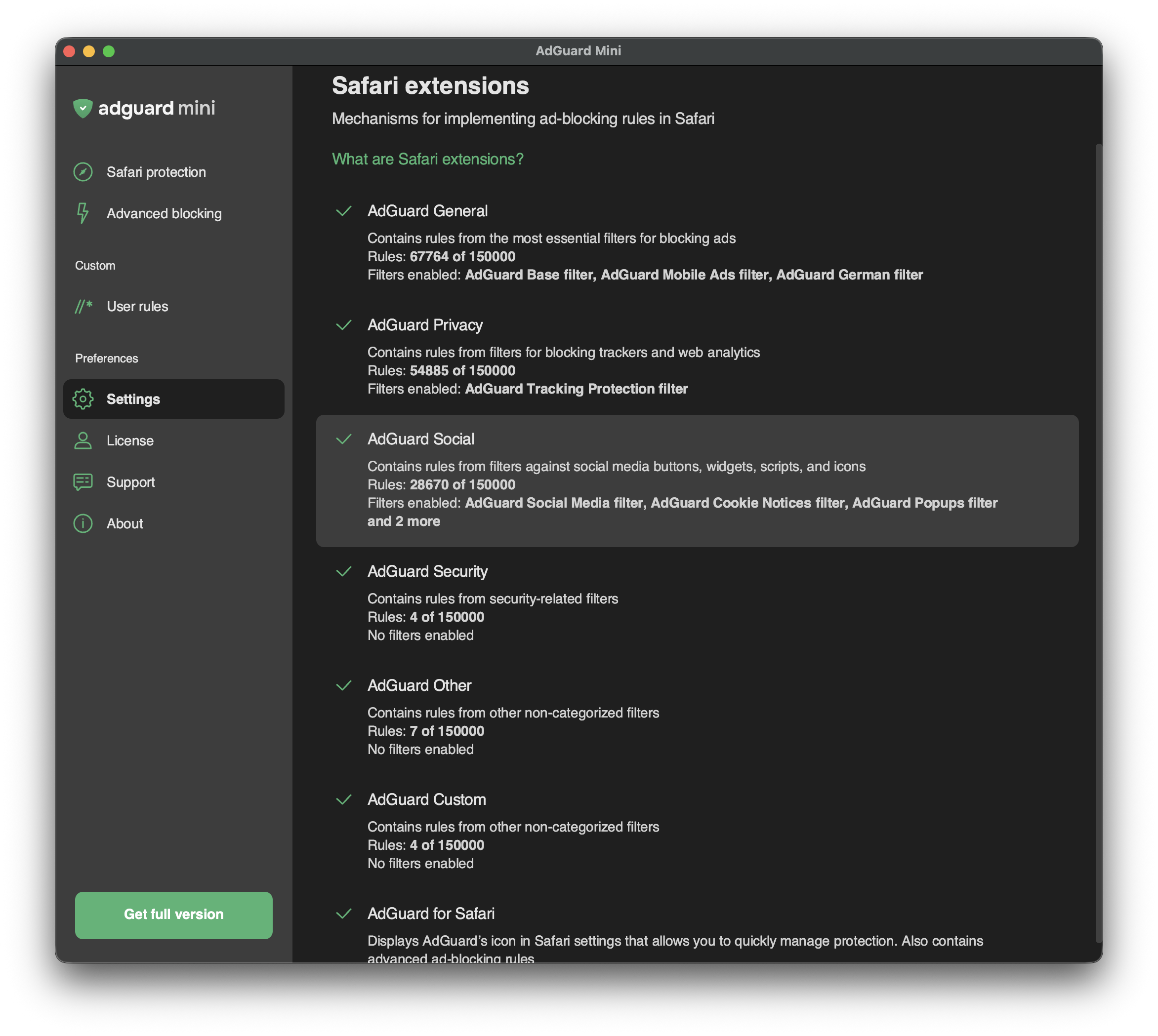
| Safari extensions are mechanisms that allow implementing content blockers — thematic clusters of filters. For example, privacy-related filters are included in the content blocker with the corresponding name — *AdGuard Privacy*. | ||
|
|
||
| Content blockers were designed for two reasons: to structure filters and to conform to Apple’s restrictions. | ||
|
|
||
| [In 2019](https://adguard.com/en/blog/adguard-safari-1-5.html), Apple put limitations on ad blockers for Safari, allowing them to use only 50,000 filtering rules simultaneously. As this number was not enough for an ad blocker to provide a good filtering quality (*AdGuard Base Filter* alone has 30,000 filtering rules), we divided AdGuard for Safari into six content blockers each containing up to 50,000 rules. | ||
|
|
||
| [In 2022](https://adguard.com/en/blog/adguard-for-safari-1-11.html), Apple increased the filtering rule limit for each content blocker to 150,000 rules applied simultaneously. Regarding AdGuard Mini for Mac, up to 900,000 rules can be enabled for all six content blockers. | ||
|
|
||
| Whereas the limit has been increased, the structure of content blockers has remained the same. | ||
|
|
||
| In *Safari extensions*, you can see which content blockers are enabled, how many rules each of them is using, and which filters are functioning. | ||
|
|
||
| :::tip | ||
|
|
||
| You can manage enabled filters in *Settings* → *Filters*. In *Safari extensions*, you can only see the list of enabled filters and the number of enabled rules. | ||
|
|
||
| ::: | ||
|
|
||
| ## List of AdGuard Mini’s Safari extensions | ||
|
|
||
| ### AdGuard General | ||
|
|
||
| *AdGuard General* is a content blocker that combines the most essential filters for blocking ads. We recommend keeping *AdGuard Base Filter* always enabled. | ||
|
|
||
| ### AdGuard Privacy | ||
|
|
||
| This content blocker is the main tool against counters and other web analytics tools. The *AdGuard Tracking Protection filter* is enabled by default. | ||
|
|
||
| ### AdGuard Social | ||
|
|
||
| *AdGuard Social* contains filters against social media buttons, widgets, scripts, and icons. Other annoyance filters can also be found in this section: filters against popups, banners, cookie notices, and more. To enable them, find *Social Widgets* in *Settings* → *Filters*. | ||
|
|
||
| ### AdGuard Security | ||
|
|
||
| This content blocker unites several security-related filters. *Malware Domains Blocklist* blocks domains that are notorious for spreading malware and spyware. *Spam404* protects you from Internet fraudsters. *NoCoin Filter List* disrupts browser-based cryptominers, such as Coinhive. | ||
|
|
||
| ### AdGuard Other | ||
|
|
||
| *AdGuard Other* contains filters with various functions. For example, it has a filter that unblocks search ads and self-promo ads. In some cases, it helps find exactly what you are looking for, because these kinds of ads are more relevant and less intrusive than others. | ||
|
|
||
| :::note Disclaimer | ||
|
|
||
| We don’t have any “acceptable ads” paid by advertisers. Instead, we provide users with an option to see [search ads and websites’ self-promotion](/general/ad-filtering/search-ads). | ||
|
|
||
| ::: | ||
|
|
||
| ### AdGuard Custom | ||
|
|
||
|  | ||
|
|
||
| If you need more filters, you can add them to *AdGuard Custom* extension. | ||
|
|
||
| To add a custom filter, go to *Settings* → *Filters* → *Custom filters* and enter a URL or a local file path in the relevant field. You can find new filters at [filterlists.com](https://filterlists.com/). |
| Original file line number | Diff line number | Diff line change |
|---|---|---|
| @@ -0,0 +1,20 @@ | ||
| --- | ||
| title: Settings | ||
| sidebar_position: 5 | ||
| --- | ||
|
|
||
|  | ||
|
|
||
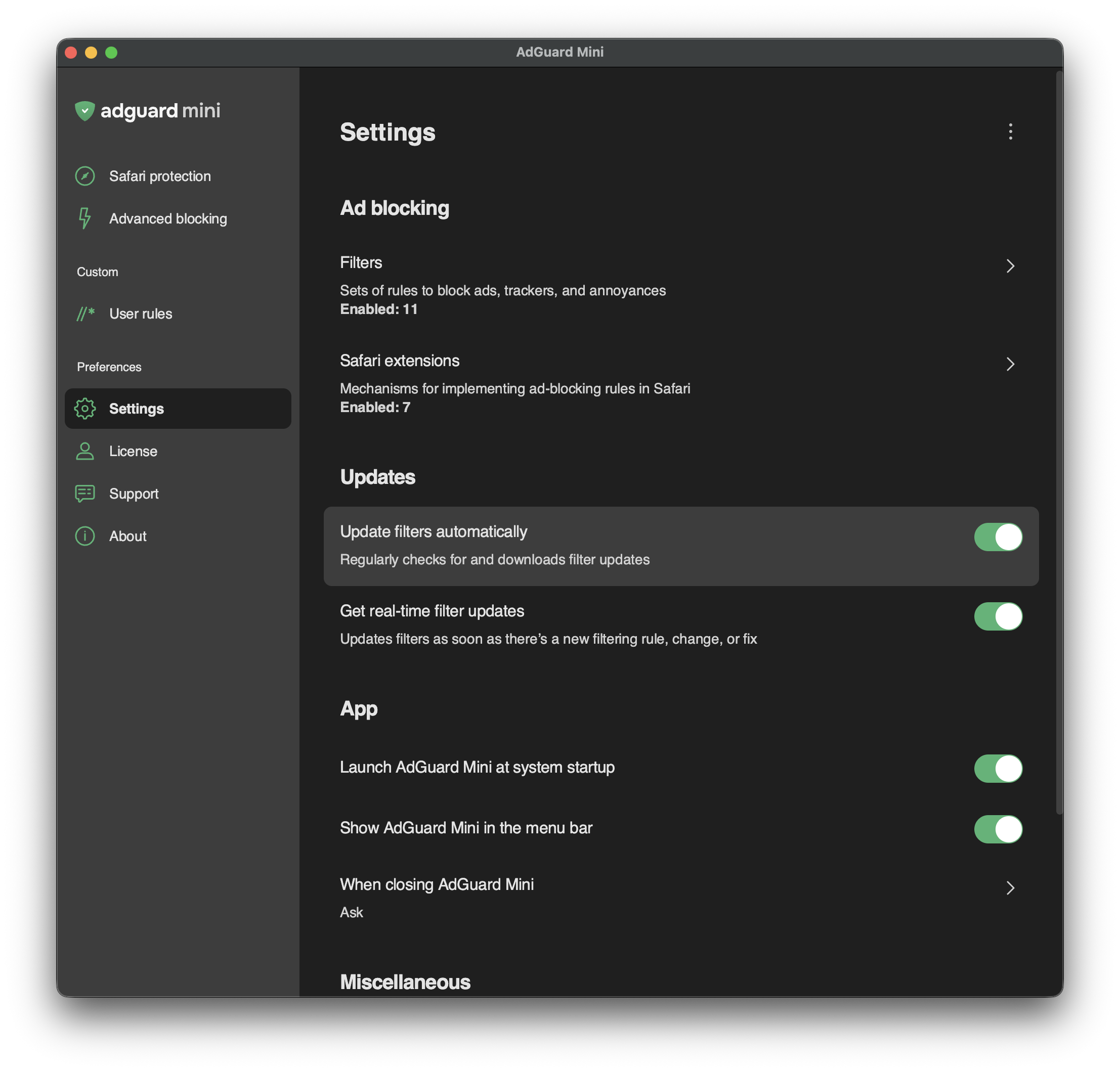
| In *Settings*, you can set up basic things like filters, filter updates, launching AdGuard at system startup, and so on. You can also choose whether to show the AdGuard icon in the menu bar. | ||
|
|
||
| The main two sections are: | ||
|
|
||
| - [Filters](/adguard-mini-for-mac/features/settings/filters.md) | ||
|
|
||
| Different filters that allow you to customize your ad blocking experience | ||
|
|
||
| - [Safari extensions](/adguard-mini-for-mac/features/settings/safari-extensions.md) | ||
|
|
||
| Info on the current state of content blockers — how many rules and filters are enabled for each of them | ||
|
|
||
| At the bottom of the *Settings* screen, you can find options that come in handy when communicating with our support team: *Debug logging* and *Export logs*. |
There was a problem hiding this comment.
Choose a reason for hiding this comment
The reason will be displayed to describe this comment to others. Learn more.
AdGuard Mini will also have a separate privacy notice available at https://adguard.com/en/privacy/mini-mac.html. You can replace the link later, when it's published