MultiComboBox zh CN
适用于: v1.1.6 或更新的版本
此文档待补充。
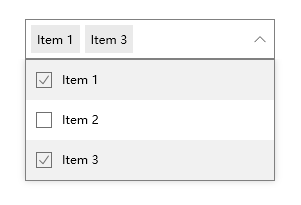
<pu:MultiComboBox Height="40"
                  Width="250">
    <pu:MultiComboBoxItem Content="Item 1"
                          IsSelected="True" />
    <pu:MultiComboBoxItem Content="Item 2" />
    <pu:MultiComboBoxItem Content="Item 3"
                          IsSelected="True" />
</pu:MultiComboBox>
xmlns:pu="https://opensource.panuon.com/wpf-ui"
xmlns:purs="clr-namespace:Panuon.WPF.UI.Resources;assembly=Panuon.WPF.UI"
...

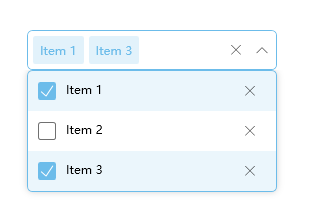
<pu:MultiComboBox Height="40"
                  Width="250"
                  BorderBrush="#6CBCEA"
                  CornerRadius="5"
                  ItemsRemoveButtonVisibility="Visible"
                  ClearButtonVisibility="VisibleOnFocusedAndNonnull"
                  ItemsSelectedBackground="#226CBCEA">
    <pu:MultiComboBox.SelectionBoxItemLabelStyle>
        <Style TargetType="Label"
               BasedOn="{StaticResource {x:Static pu:MultiComboBox.SelectionBoxItemLabelStyleKey}}">
            <Setter Property="Foreground"
                    Value="#6CBCEA" />
            <Setter Property="Background"
                    Value="#336CBCEA" />
            <Setter Property="pu:LabelHelper.CornerRadius"
                    Value="2" />
            <Setter Property="Padding"
                    Value="7,0" />
        </Style>
    </pu:MultiComboBox.SelectionBoxItemLabelStyle>
    <pu:MultiComboBox.CheckBoxStyle>
        <Style TargetType="CheckBox"
               BasedOn="{StaticResource {x:Static pu:MultiComboBox.CheckBoxStyleKey}}">
            <Setter Property="Foreground"
                    Value="#F1F1F1" />
            <Setter Property="pu:CheckBoxHelper.BoxHeight"
                    Value="18" />
            <Setter Property="pu:CheckBoxHelper.BoxWidth"
                    Value="18" />
            <Setter Property="pu:CheckBoxHelper.CornerRadius"
                    Value="2" />
            <Setter Property="pu:CheckBoxHelper.HoverBorderBrush"
                    Value="#6CBCEA" />
            <Setter Property="pu:CheckBoxHelper.CheckedBackground"
                    Value="#6CBCEA" />
            <Setter Property="pu:CheckBoxHelper.CheckedBorderThickness"
                    Value="0" />
            <Setter Property="pu:CheckBoxHelper.CheckedGlyphBrush"
                    Value="#FFFFFF" />
        </Style>
    </pu:MultiComboBox.CheckBoxStyle>
    <pu:MultiComboBoxItem Content="Item 1"
                          IsSelected="True" />
    <pu:MultiComboBoxItem Content="Item 2" />
    <pu:MultiComboBoxItem Content="Item 3"
                          IsSelected="True" />
</pu:MultiComboBox>